HTTP OUTPUT
An HTTP output cue sends HTTP requests to external systems when triggered during playback. This is useful for integrating with REST APIs, web services, lighting controllers, or any HTTP-enabled device.
Creating an HTTP Output
Right-click on the timeline and select Add Output Cue, then set the protocol to HTTP.
Properties
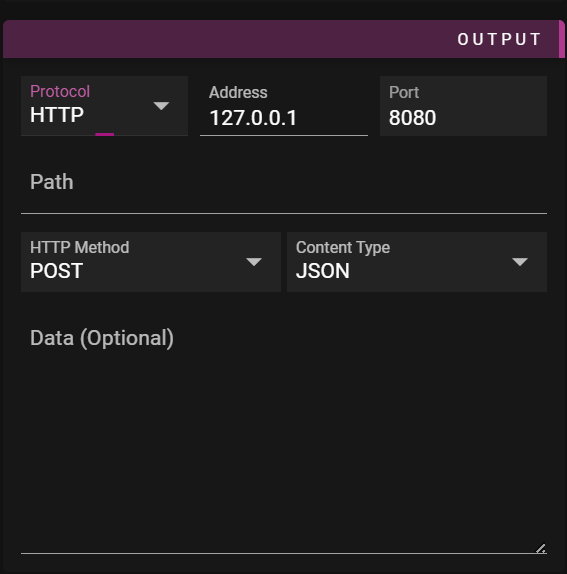
- Name - Name of the cue.
- Start Time - Cue location on the timeline.
- Protocol - Set to HTTP.
- Address - IP address or hostname of the target server.
- Port - Port number (typically 80 for HTTP or 443 for HTTPS).
- Path - URL path for the request (e.g.,
/api/command). - Method - HTTP method to use:
- POST (default) - Send data in request body
- PUT - Update resource with data in request body
- GET - Request without body (data is ignored)
- Content Type - MIME type for the request body:
- JSON (
application/json) - Default, for JSON payloads - XML (
application/xml) - For XML payloads - Plain Text (
text/plain) - For plain text data
- JSON (
- Data To Send - The content to send in the request body.
Examples
Triggering a Webhook
Send a JSON payload to a webhook endpoint:
- Address:
192.168.1.100 - Port:
8080 - Path:
/webhook/trigger - Method:
POST - Content Type:
JSON - Data:
{"event": "show_started", "timeline": "Main"}
Controlling a Device API
Send a command to a lighting controller:
- Address:
10.0.0.50 - Port:
80 - Path:
/api/v1/scenes/activate - Method:
PUT - Content Type:
JSON - Data:
{"scene_id": 5}
Simple GET Request
Trigger an action via URL (no body needed):
- Address:
192.168.0.100 - Port:
80 - Path:
/trigger?action=start - Method:
GET - Data: (leave empty)
Tips
- Use expressions in the Data To Send field to include dynamic values
- HTTP requests are sent asynchronously and do not block playback
- Connection errors are logged but do not stop the show
- For HTTPS endpoints, use port 443
Note: HTTP output does not currently support authentication headers. For APIs requiring authentication, consider using a local proxy or middleware service.