
Output Cues
An Output Cue sends an external message when the playhead reaches it. WATCHOUT sends a string payload over TCP, UDP, or HTTP. Use Output Cues to drive automation controllers, show-control middleware, lighting desks, and other network devices that accept string commands. An Output Cue is a point-in-time event with no duration.
What Output Cues Are
An Output Cue is a distinct cue type, separate from Control Cues. It sends string data to a network destination when the playhead reaches its position. Output Cues do not change WATCHOUT's playback state.
Key characteristics:
- Point-in-time execution — the cue fires at its start time and has no duration.
- String-based payload — the cue sends a single string value. This is the only output format.
- Three transport protocols — TCP, UDP, and HTTP. There is no OSC output.
Creating an Output Cue
- Position the playhead at the time the message should send.
- Right-click the Timeline to open the context menu.
- Select Add Output Cue.
- The cue appears at the playhead position. Select it to open its properties.
- Set the protocol, address, port, and payload string in the Cue Properties panel.
- Optionally name the cue.
Name every Output Cue, for example Lights_Scene3_Go. Unnamed cues are hard to audit in a show with many Output Cues.
Output Cue Properties
Select an Output Cue to view its properties.
| Setting (UI) | Purpose | Default |
|---|---|---|
| Name | Optional display label | None |
| Protocol | Transport protocol: TCP, UDP, or HTTP | None — set explicitly |
| Address | Destination IP address | None |
| Port | Destination port number | None |
| Path | URL path appended to the address (HTTP only) | None |
| HTTP Method | HTTP request method: POST or PUT | POST |
| Content Type | Body content type: JSON, XML, or Plain Text | JSON |
| Keep Connection Alive | Reuse the TCP connection across cues | On |
| Data | The string payload to transmit | Empty |
Protocols
Output Cues support three transport protocols. There is no OSC protocol.
| Protocol | Description | Applicable Fields |
|---|---|---|
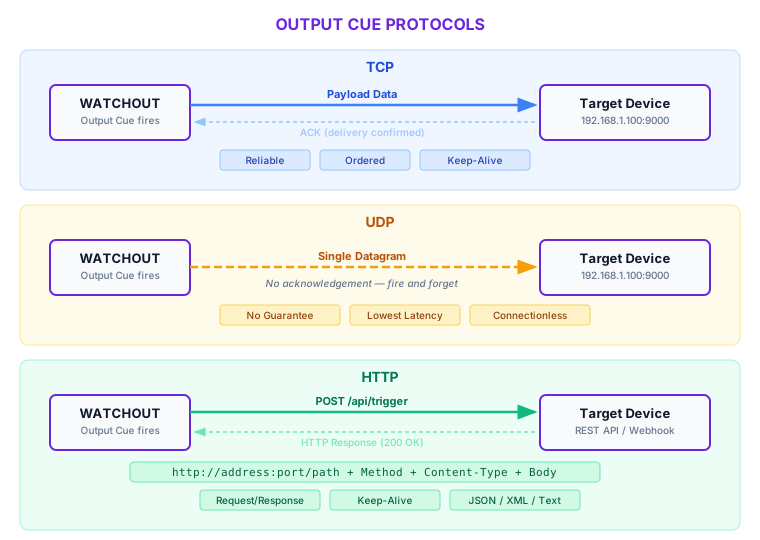
| TCP | Sends the payload over a TCP connection to the target address and port. Reliable, ordered delivery. | Address, Port, Keep Connection Alive, Data |
| UDP | Sends the payload as a single UDP datagram. No delivery guarantee. | Address, Port, Data |
| HTTP | Sends the payload as the body of an HTTP request to the target address, port, and path. | Address, Port, Path, HTTP Method, Content Type, Data |
HTTP Configuration
When the protocol is set to HTTP, three additional fields become relevant:
HTTP Method controls the request verb:
| Method | Use Case |
|---|---|
| POST (default) | Sending commands or data to a REST API endpoint |
| PUT | Updating a resource on a REST API endpoint |
Content Type sets the Content-Type header on the request:
| Content Type | Header Value | When to Use |
|---|---|---|
| JSON (default) | application/json | REST APIs expecting JSON payloads |
| XML | application/xml | XML-based automation protocols |
| Plain Text | text/plain | Simple string commands or legacy HTTP endpoints |
Path is appended to the address and port to form the full URL. With address 192.168.1.100, port 8080, and path /api/trigger, the request goes to http://192.168.1.100:8080/api/trigger. WATCHOUT always sends over HTTP. It does not switch to HTTPS based on the port.
HTTP Output Cues do not support custom authentication headers. If the target API requires authentication, use a proxy or middleware service that adds the headers before forwarding.
TCP and UDP Configuration
For TCP and UDP, set these fields:
- Address — the IP address of the target device. Must be reachable from the node on the show network.
- Port — the port the target device listens on.
- Keep Connection Alive (TCP only) — On by default. The TCP connection stays open after sending and the next cue to the same destination reuses it. When Off, WATCHOUT closes the connection after each send.
UDP does not use the keep-alive setting. UDP is connectionless.
UDP does not guarantee delivery. If an output cue fires over UDP and the target device misses the datagram due to network congestion or packet loss, the message is lost with no retry. For safety-critical or mission-critical triggers, use TCP or HTTP and verify receipt at the application level.
Payload Data
The Data field contains the string payload sent to the target. This is the only output format. There is no binary or structured-object mode.
Formatting considerations:
- JSON payloads — when using HTTP with the Json content type, ensure the data field contains valid JSON (e.g.,
{"command": "go", "scene": 3}). - XML payloads — when using Xml content type, provide well-formed XML in the data field.
- Plain text and raw TCP/UDP — for TCP and UDP protocols, or HTTP with PlainText content type, the data string is sent as-is. Include any required delimiters, line endings, or framing characters that the target device expects.
- Empty payloads — for simple trigger-on-connect TCP workflows, the data field can be left empty.
Escape Sequences
WATCHOUT unescapes the Data string before sending. Payloads support backslash escape sequences for special characters:
| Sequence | Meaning |
|---|---|
\n | Newline (line feed) |
\t | Tab |
\xNN | Byte value in hexadecimal (for example \x0D for carriage return) |
\uNNNN | Unicode code point |
After unescaping, WATCHOUT keeps only characters with a code point below 256 and sends each as one byte. Characters at or above U+0100 are dropped.
Important Behavior Notes
- Point-in-time firing. An Output Cue fires when the playhead reaches its exact position during playback. WATCHOUT collects Output Cues by their start time.
- Asynchronous transmission. WATCHOUT sends payloads on background tasks. The send does not block playback. The playhead advances immediately after the cue fires.
- Connection errors are non-fatal. A failed connection or a non-success HTTP status is logged. It does not stop playback.
- No condition check at send time. WATCHOUT collects Output Cues by start time without evaluating cue conditions or expressions. An Output Cue fires when the playhead reaches it.
- Separate from Control Cues. Output Cues and Control Cues are distinct cue types. Control Cues change playback state. Output Cues send data to external systems.
Use Cases
Triggering automation systems. Send a TCP or UDP command to a show automation controller (e.g., a PLC or industrial control system) at a precise moment in the timeline — for example, starting a motorized set piece movement exactly when a video transition begins.
Show control middleware. Send HTTP requests to middleware platforms (such as Medialon, Crestron, or custom Node.js servers) that coordinate multiple subsystems. An output cue can notify the middleware that a specific show moment has been reached, allowing it to trigger downstream actions.
External effects. Fire fog machines, pyrotechnics controllers, or water features by sending a network command at the exact frame. Combine with TCP for reliable delivery or UDP for minimal latency.
Lighting integration. Send string commands to lighting control systems that accept network triggers. While WATCHOUT supports Art-Net for direct DMX control via Art-Net Fixture Cues, output cues provide an alternative path for systems that accept TCP, UDP, or HTTP commands instead of DMX.
Logging and monitoring. Send HTTP POST requests to a logging server each time a key show moment is reached, creating an audit trail of show execution timing.
Best Practices
- Keep payloads deterministic and documented. Every output cue's protocol, address, port, and data string should be recorded in your show documentation. When multiple operators or integrators work on the same show, undocumented output cues become a debugging liability.
- Test cue timing at full playback speed. Output cues fire at the playhead's real-time position. Test with the show running at normal speed, not in scrub or step mode, to validate that external systems respond within acceptable latency.
- Validate on the production network. Network behavior differs between a single-machine bench test and the actual production network. Firewall rules, VLANs, and switch configurations can all prevent output cues from reaching their targets. Test on the same network architecture used in the live show.
- Use keep-alive for rapid-fire TCP cues. When several Output Cues target the same TCP endpoint in quick succession, leave Keep Connection Alive on to avoid connection setup on every cue.
- Prefer TCP or HTTP for critical triggers. Reserve UDP for latency-sensitive, non-critical messages where occasional packet loss is acceptable. For anything that must arrive reliably, use TCP or HTTP.
If external systems controlled by Output Cues are safety-critical (pyrotechnics, motorized scenery, emergency lighting), add operator confirmation and independent safety interlocks outside timeline automation. Output Cues are a show-control tool, not a safety system.
Troubleshooting
For output cue problems (cue does not fire, no response, connection refused, malformed payload, latency), see Timeline and Cue Issues → Output Cues.
Related
- Control Cues — separate cue type for playback state changes (play, pause, jump)
- Variables and Variable Cues — variable-driven automation for dynamic show control