
Color Pipeline
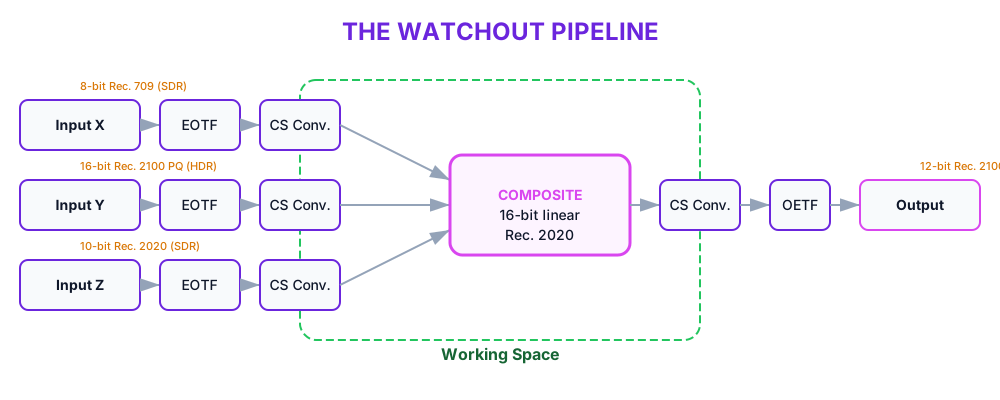
WATCHOUT manages color from the moment a media file is decoded, through all compositing and effects, to the signal sent to each display. The same pipeline handles standard dynamic range (SDR) and high dynamic range (HDR). This page explains how a pixel travels through it. For the per-display output settings, see HDR and Color Management.
Stages
Every pixel passes through the same stages, whatever the source format:
| Stage | What happens |
|---|---|
| Input | The pixel values stored in the media file, in their own color space. |
| Decode | The EOTF turns the stored signal back into linear light, then a color conversion brings the colors into the working space's Rec. 2020 gamut. |
| Composite | All layering, blending, and effects happen in the internal working space. Working in linear light keeps blends, fades, and gradients accurate. |
| Encode | A color conversion takes the colors from the working space to the display's color space, then the matching OETF encodes them — for example PQ for an HDR display, or a gamma curve for an SDR display. |
| Output | The encoded signal is sent to each display at its configured bit depth. |
The Internal Working Space
WATCHOUT does all of its color math — effects, fades, and compositing — in one internal working space with two properties:
- Linear light. Values are proportional to real light, not to the coded levels of a video signal. Light adds up the way it does in the real world, so blends and fades look correct instead of over-bright or muddy. Each color component is kept at 16-bit precision, which keeps fine gradients smooth through many operations.
- Wide color range. It spans the same set of colors (the gamut) as the Rec. 2020 standard, so saturated colors survive processing instead of being clipped.
This involves two color conversions: incoming content is converted into the working space (the Rec. 2020 gamut), and after compositing the result is converted to each output's color space.
The Rec. 2020 standard also defines coded signal levels (a transfer function). WATCHOUT borrows its wide color range but works in linear light — so "linear Rec. 2020" is a convenient shorthand, not literally the Rec. 2020 signal.
Where Color Is Set
- Asset color space — how WATCHOUT reads the pixels in a media file, set per asset. See Asset Color Space.
- Per-cue color effects — brightness, contrast, hue, and the rest, applied in the working space. See Color Adjustments.
- Per-display output — the color space, transfer function, and bit depth of the signal each display receives. See HDR and Color Management.
Related
- HDR and Color Management — output color spaces, transfer functions, bit depth, and white point.
- Color Adjustments — the per-cue color effects applied in the working space.
- Display Properties — where per-display output color is configured.