
Welcome to WATCHOUT 7
WATCHOUT 7 is the latest evolution of Dataton's award-winning multi-display production and playback system. Designed for show creators, live event professionals, and system integrators, WATCHOUT empowers you to orchestrate massive-scale visuals across unlimited displays, projectors, and LED walls—all from a single timeline.
Whether you are creating a digital signage installation, a projection mapping spectacle, a live concert background, or a corporate presentation, WATCHOUT provides the tools to compose, manage, and play back high-resolution assets with frame-accurate synchronization.
The Core Concept: One Giant Canvas
If you are new to multi-display systems, the easiest way to understand WATCHOUT is to think of it as one giant digital canvas.
In a traditional video wall made of multiple displays, you typically need a separate video file and player for each display. WATCHOUT eliminates this complexity.
With WATCHOUT, you place your content on a Stage — a continuous workspace representing your entire display area. You can drag a video across all screens or animate an image from one side to the other. The system treats the entire display arrangement as a unified creative space.
System Architecture
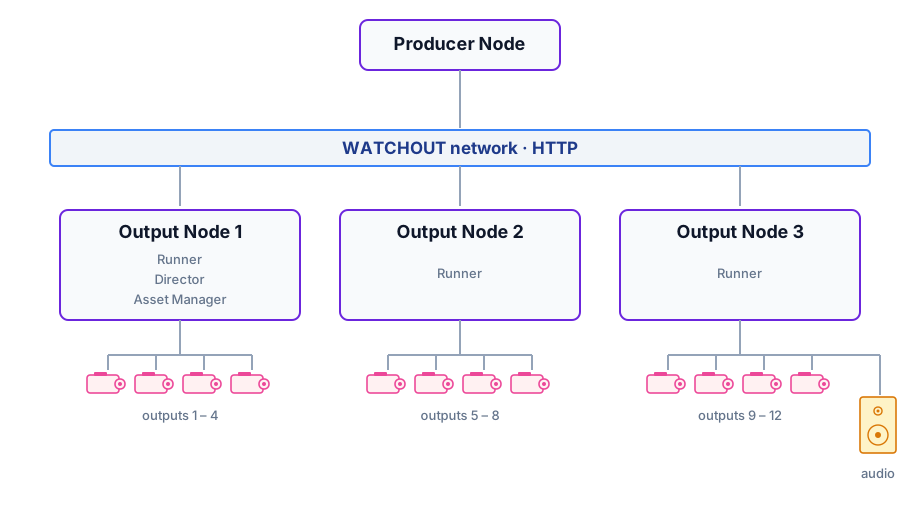
WATCHOUT is a suite of services. Any computer running WATCHOUT is a node. A single node can run an entire show, within the limits of its hardware and the WATCHOUT license. In practice, larger shows are split across multiple nodes. Production and playback are also typically kept on separate nodes — Producer on one, Runners on the others.
Four services are worth knowing:
- Producer — the application you use to design your show.
- Director — holds the show state and keeps every Runner in sync during playback.
- Asset Manager — stores assets, optimizes them for playback, and distributes them to the Runners that need them.
- Runner — the playback engine on an output node. It drives the connected displays and audio outputs.
A show has one Producer, one Director, and one Asset Manager, but one Runner per output node — you add more Runners as the show grows.
Where Director and Asset Manager run
By default, the Director and the Asset Manager are hosted on the Producer node — installing Producer gives you all three immediately, which keeps initial setup simple.
For a fixed installation that runs unattended once programmed, the Producer node is removed after setup and the show is driven by an external control system through WATCHOUT's external-control API. In that case the Director must live on one of the Runner nodes so playback keeps running without Producer present.
The Asset Manager is only active while a show is being programmed or updated — once assets have been optimized and distributed to the Runners, it sits idle. For an unattended fixed installation, host the Asset Manager on a Runner node as well.
Producer and Runner on the same node share GPU and SSD. Producer's Stage-preview renderer and the Runner's playback renderer use the same hardware. For small setups this is usually fine; for multi-screen shows, check that frames are not dropped before going live, and move Producer to its own node if they are.
There is also a licensing consideration: the Asset Manager needs a license key to optimize most asset types (video to anything beyond HAP, image sequences). Producer itself does not. Hosting the Asset Manager on a Runner node — which already has a license for the Runner — avoids the need for a separate license on a dedicated Producer node.
License limits
Each Runner node can drive up to 70,778,880 pixels across its physical outputs — equivalent to 8 × DCI 4K (4096 × 2160 × 8). The limit is the same for every WATCHOUT license; there is no tiered cap.
Only physical outputs count toward the budget. Virtual displays are excluded.
If adding a display would push the total over the limit, that display is rejected. Existing displays keep playing. The current pixel usage per node is visible in the Nodes window under System → Pixel usage.
Sizing the system
The size of a WATCHOUT system is set by the number of displays you need to drive and their resolution. A typical workstation GPU has four physical outputs. A 12-projector show therefore needs three Runner nodes — four outputs each, three nodes, twelve projectors. During show setup, Producer typically runs on a separate node — often a laptop. The example then becomes one Producer node and three Runner nodes, one of which also drives the show's audio.
What You Can Create
WATCHOUT is a blank canvas limited only by your hardware and imagination. Common applications include:
- Wide-screen Projection: Blends multiple projectors to form massive panoramic screens.
- Projection Mapping: Wraps video content around complex 3D objects or buildings.
- LED Video Walls: Drives custom-resolution LED processors with pixel-perfect accuracy.
- Digital Signage: Synchronizes playback across multiple monitors throughout a venue.
- Live Broadcasts: Provides dynamic backdrops and lower-thirds for broadcast or streaming.
- Interactive Installations: Triggers content based on external inputs from sensors, buttons, or network commands.
The system adapts to your creative vision, whether you are designing an intimate gallery experience or a stadium concert.
Integration Options
WATCHOUT connects with a wide range of external systems through industry-standard protocols:
- Art-Net / DMX — communicate with lighting consoles and DMX controllers.
- OSC — link with audio systems, modern control surfaces, and custom software interfaces.
- MIDI — use control surfaces and MIDI Show Control (MSC) for triggering and transport.
- Timecode (LTC) — stay in sync with SMPTE linear timecode from external sources.
- Show Control Systems — work with Crestron, AMX, and similar automation platforms.
- WATCHOUT Protocols — the HTTP REST API for modern integrations, with a compatibility layer for legacy control systems.